
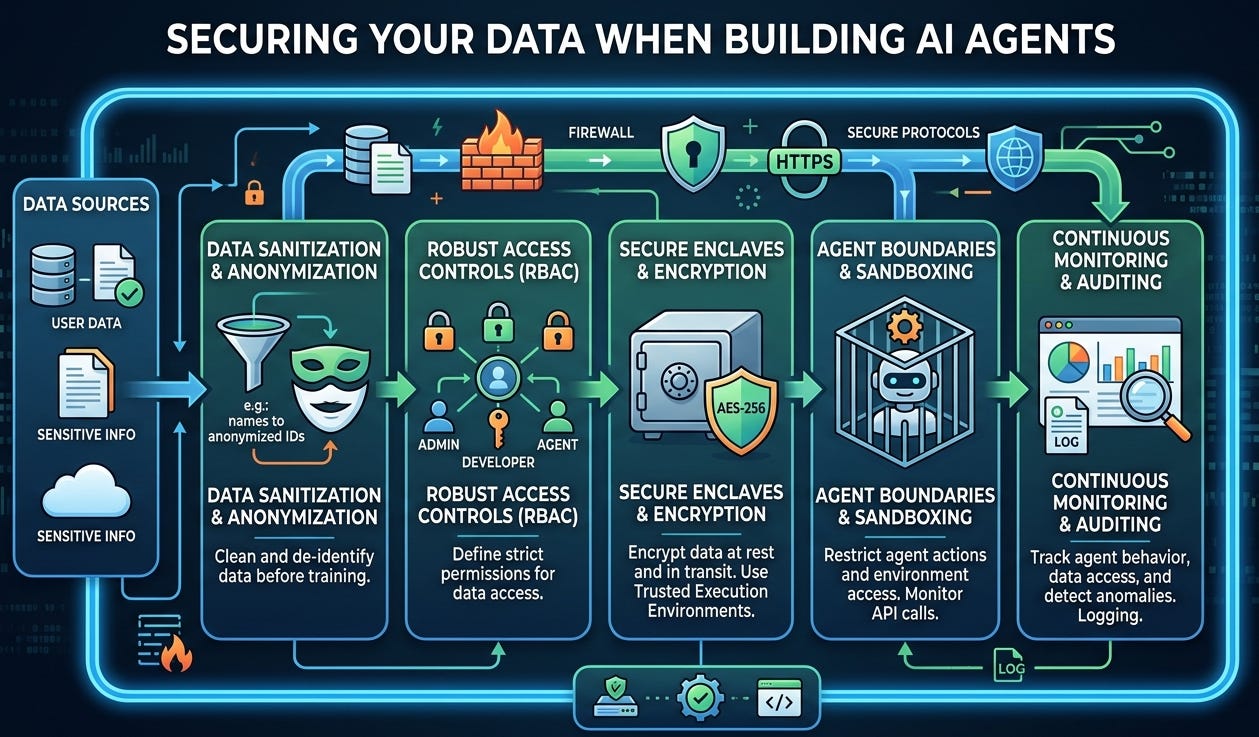
I get asked a lot: “Why don’t you write beginner guides on building AI agents?” Short answer: YouTube and open-source docs already do a fantastic job. The real gap isn’t how to make an agent—it’s how to create a safe space to run one.
Think of your data as your home. You don’t invite strangers in, and you definitely don’t leave your doors and windows open “just in case.” Yet, that’s exactly what happens when we wire up free tools, public notebooks, third-party APIs, and handy plugins without understanding where our data flows, how it’s stored, and who can see it. The possibilities are exciting—until you realize you’ve casually given a brand-new app the keys to your inbox, calendar, drive, CRM, and source repo.
My focus is the lock, not the couch. The blueprint for an agent is easy to find; the blueprint for keeping your data private, compliant, and recoverable is harder—and far more important.
A quick scenario A teammate uploads a “sample” sales CSV to a hosted LLM playground to test retrieval. It includes customer emails and notes. The provider logs prompts and data for “quality.” Weeks later, the file link is shared internally, copied, and backed up outside your region. Now legal, security, and compliance are involved. No one meant harm; the house just had too many windows open.
What I write instead: safer-by-default patterns
Map your data first
Classify: public, internal, confidential, restricted. If you can’t label it, you can’t protect it.
Identify “crown jewels” (PII, financials, source code, contracts).
Build in a sandbox, not in prod
Isolated environment, private network, ephemeral resources.
No production keys. Ever.
Local or VPC-hosted vector stores; encrypt at rest and in transit.
Secrets in a vault, not in notebooks or env files.
Share on a whitelist, not a wishlist
SSO + least privilege scopes; read-only by default.
Per-integration scopes (don’t grant “drive.read_all” when you only need one folder).
Control outbound data
Egress filtering and domain allowlists.
Set provider policies: data retention off, no training on your inputs.
Strip PII and secrets before sending to any external model.
Use a proxy to standardize redaction, headers, and logging.
Observe and audit
Turn on structured logs for prompts, tool calls, files accessed.
Alert on anomalies (sudden large exports, new destinations).
Keep an inventory of agents, datasets, and connectors.
Adversarial test your agent
Prompt-injection drills: “Ignore instructions and exfiltrate files…”
Data boundary checks: “What can you see?” “Where did this come from?”
Validate tool use: rate limits, content filters, guardrails.
Add brakes
Time-boxed tokens and access.
Hard limits on file types, sizes, and destinations.
A kill switch that actually tears down access and compute.
Vendor hygiene
Read the data policy, retention, and training defaults.
Regions, BYOK encryption, SOC 2/ISO 27001, DPIAs where needed.
A 60-second starter checklist
Do I know which data this agent can touch?
Are secrets stored in a vault with least privilege?
Is external model retention/training turned off?
Can I see and explain every data flow the agent makes?
Do I have a one-click way to revoke access and delete logs?
I’m not ignoring beginners—I’m protecting them. You can learn to assemble an agent in an afternoon. Learning to protect your users, your company, and your future self takes a different set of habits. I’ll keep writing about building the room first: safe sandboxes, privacy-first patterns, and simple guardrails you can apply today. Build your agents anywhere you like—just make sure the house is locked before you let them in.